State-of-the-art AI accelerators can be out of reach for most people, Partition AI enables expensive hardware to be shared without compromising privacy.
Old AI Accelerators (e.g. Google Coral) and Graphics Processing Units (GPUs) from gamers or blockchain miners can be upcycled by the community.
Examples of some AI hardware being made available to the community for AI acceleration:
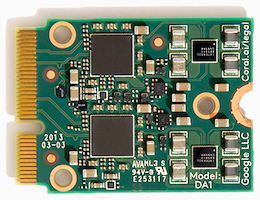
Due to the limited RAM capacity inside each TPU of only 8 MByte and the complexity of running multiple models inside at the same time, having multiple AI applications share a single TPU is not recommended.
PCI Adapter
Unfortunately, most computers do NOT have dual PCI buses wired to the same M.2 E-key connector, as required by the Coral Dual Edge TPU, so an adapter is needed in order for those computers to access both TPUs onboard.
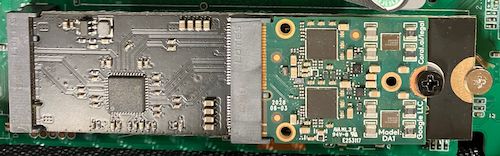
Below is a Coral Dual Edge inserted into E-key to M-key adapter from Magic Blue Smoke which is in turn inserted into the spare M.2 M-key connecter inside in a Compute Station.
This adapter uses an Asmedia ASM1182e chip to expose both TPUs on the Coral Dual Edge TPU on to 2 separate PCIe x1 Gen2 buses.
01:00.0 PCI bridge [0604]: ASMedia Technology Inc. ASM1182e 2-Port PCIe x1 Gen2 Packet Switch [1b21:1182]
        Kernel driver in use: pcieport
02:03.0 PCI bridge [0604]: ASMedia Technology Inc. ASM1182e 2-Port PCIe x1 Gen2 Packet Switch [1b21:1182]
        Kernel driver in use: pcieport
02:07.0 PCI bridge [0604]: ASMedia Technology Inc. ASM1182e 2-Port PCIe x1 Gen2 Packet Switch [1b21:1182]
        Kernel driver in use: pcieport
03:00.0 System peripheral [0880]: Global Unichip Corp. Coral Edge TPU [1ac1:089a]
        Subsystem: Global Unichip Corp. Coral Edge TPU [1ac1:089a]
04:00.0 System peripheral [0880]: Global Unichip Corp. Coral Edge TPU [1ac1:089a]
        Subsystem: Global Unichip Corp. Coral Edge TPU [1ac1:089a]
Although both TPUs on the device can be used by a single AI application at the same time, normally one TPU is fast enough for most applications, so the second TPU can be used by a different AI application.
Driver
For newer releases of Linux the following driver might be better: