barcode
Identity Security -> Alias Applications -> barcode
The Barcode Application runs fully in a web browser (e.g. on Android and iOS phones) without any server backend and no interaction with any Mobile Phone App Stores.
The barcode is scanned and the resulting data stored data on the phone, ensuring maximum privacy.
1. Barcode Format
1D Barcode formats currently supported:
- Codabar
- Code 128
- Code 39
- Code 39 VIN - use for Vehicle Identification Number
- Code 93
- EAN-8
- EAN-13
- EAN Extended - use for serial books EAN13 + UPC5
- Interleaved 2 of 5
- Standard 2 of 5
- UPC-A
- UPC-E - compressed UPC-A
Default barcode format is EAN-13.
The older UPC-A format, still in common use, is automatically converted to EAN-13 by adding a zero "0" in front.
2. Barcode Size
For trouble free scanning, barcodes should follow the relevant standards e.g. EAN-13 barcodes should have the following:
- Minimum Width 26mm
- Minimum Height 19mm
- Minimum Left and Right Clearance 3mm
- Top and Bottom Clearance 3mm is preferred but not required.
3. Camera Capture
The phone's built in camera will be used to capture the barcode.
The barcode lines MUST be parallel to the SHORT side of the camera view.
Notice in the images below, whether it is in landscape view or in portrait view, the barcode's vertical lines must be aligned in the same direction with the shorter side of the phone's screen.
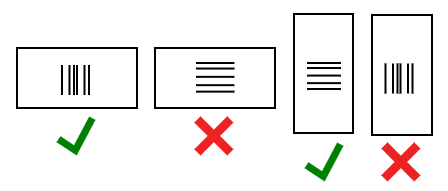
The barcode image should be Large and Clear (zoomed in and sharply focused)
If the phone camera performance is poor, the Barcode Client can alternatively accept images from other sources (e.g. SMS, Bluetooth, AirDrop etc.) uploaded from the phone's file system.
If the barcode is detected successfully, it will be shown as below
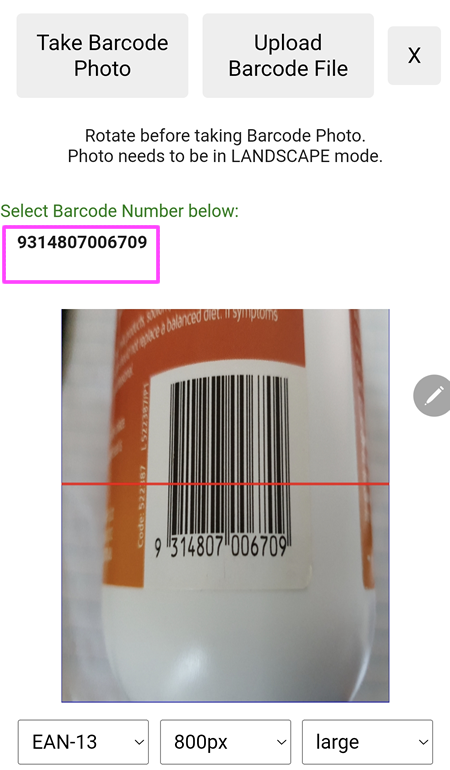
Clicking on the barcode number (as shown in the purple rectangle above) to create a Pin.
4. Map Display
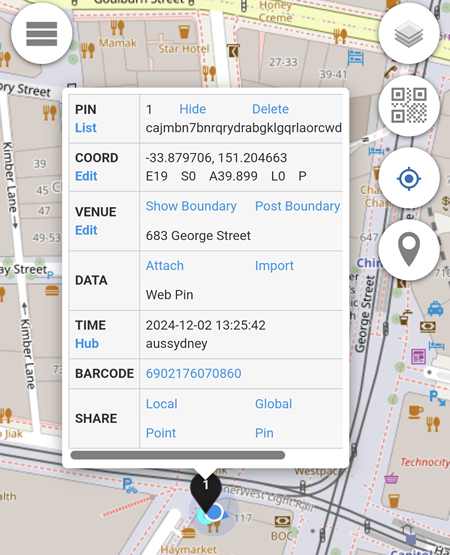
A successful barcode scan will add a  to the map.