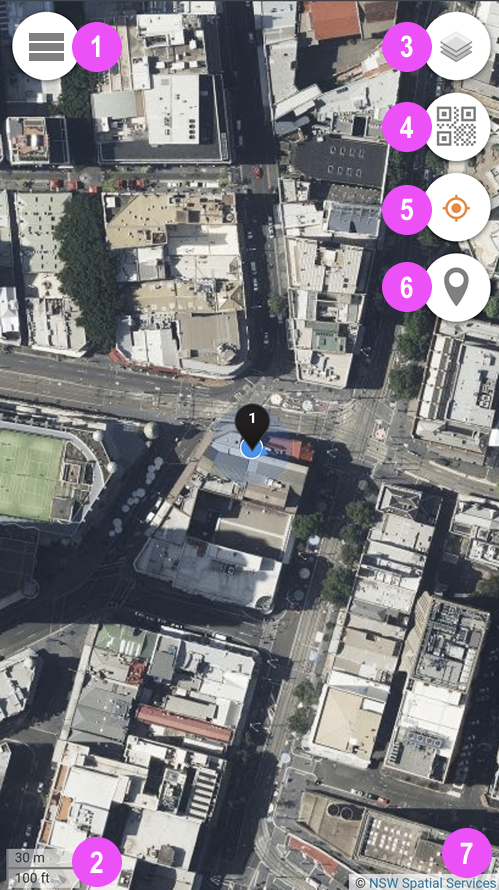
The Menu button is situated on the upper LEFT corner of Team Alias, there are also 4 round Action Buttons in the upper RIGHT corner.
Minimised Menu
1 - Menu Button
2 - Map Scale
3 - Background Map
4 - Camera Scanner
5 - Current Location
6 - Location Pins
7 - Map Copyright
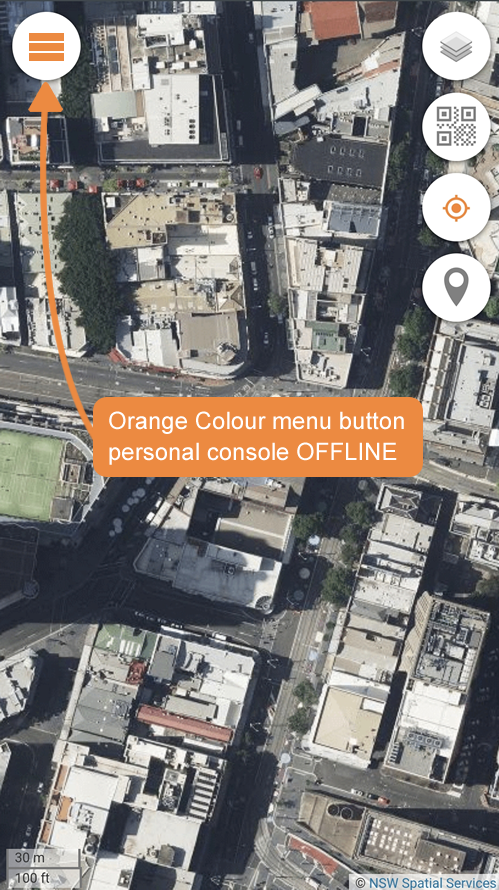
When the Team Alias is running OFFLINE (without internet access), the Menu Button turns from Grey to Orange.
Some functions (e.g. data collection) are still possible even when OFFLINE. For example, you are out of radio range or your phone in airplane mode.
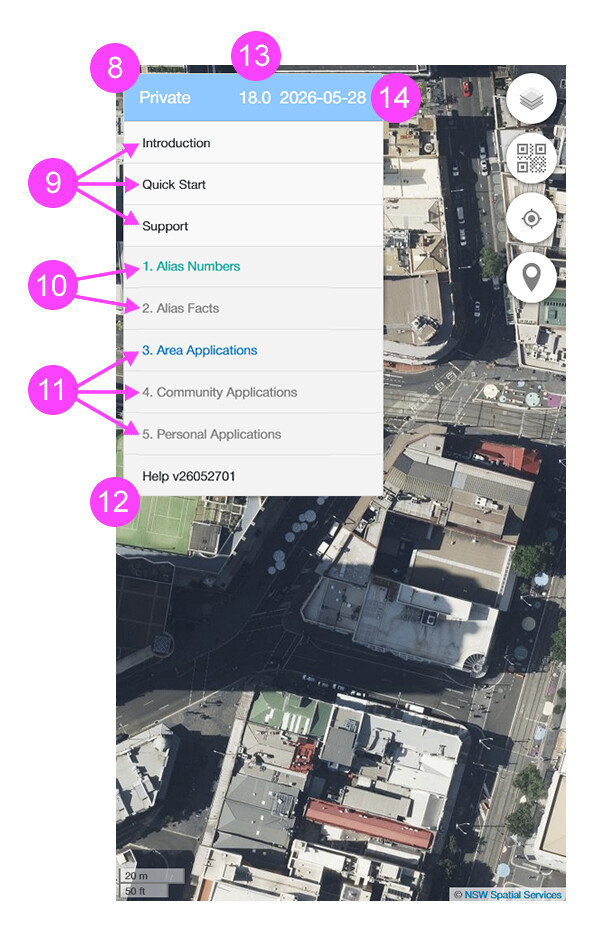
By default, all Team Aliases start with a Private Alias. You can confirm the Alias type loaded by the word "Private" shown in the top of the menu.
Private Menu
8 - Alias Type
9 - Outstanding Notifications
10 - Security Teams
11 - Productivity Teams
12 - Help Menu
13 - Map Zoom Level
14 - Date Displayed
Note in image of the Private Menu above:
There is a 9 - Outstanding Notifications section shown, indicating that there are 3 outstanding notifications. Simply click on them to read them and they will not appear again.
There are five Compute Team types preloaded into your Privacy Control, but initially only 2 of those types are activated. Their colours are no longer grey (either Green 10 - Security Teams or Blue 11 - Productivity Teams).
Alias Numbers - activatedAlias Facts Area Applications - activatedCommunity Applications Personal Applications
There is a "Help" button at the bottom of the menu showing you the version of your Alias Console. Click this Help Link for details.
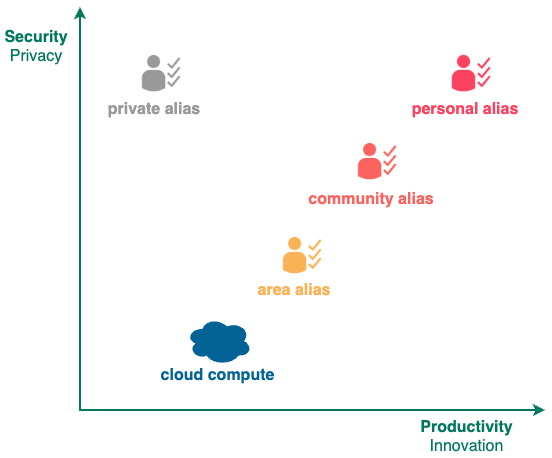
Currently there are 4 types of aliases, some aliases have more menu permissions (they can perform more operations) than others.
Private Alias has the least permissions
Area Alias has more permissions including all Private Alias permissions.
Community Alias has even more permissions including all Area Alias permissions.
Personal Alias has the most permissions including all Community Alias permissions.
Menu items listed below with the following symbols requires the following aliases:
Symbol
Alias
no symbol
Private Alias
~Area Alias
#Community Alias
^Personal Alias
Those menu items without the above symbols are available to ALL aliases.
Last updated on 28-May-2026.
Currently, there can be up to 3 independent Alias Teams defined to perform the Alias Function (Team A, Team B, Team C). Normally only Team A has active Team Domains predefined.
You can assemble an Alias Asset Teams by putting 9 Team Domains together.
0
1
2
3
4
5
1
Teams
Team A
Monitor
--
--
2
Teams
Team A
Payment
--
--
3
Teams
Team A
Phone
--
--
4
Teams
Team A
Support
--
--
5
Teams
Team A
Client
--
--
6
Teams
Team A
File
--
--
7
Teams
Team A
Ecosystem
--
--
8
Teams
Team A
Verification
--
--
9
Teams
Team A
Identity
--
--
10
Teams
Team A
STATUS
In Use
Idle
0
1
2
3
4
5
1
1. Alias List
i. Create Alias
--
--
--
2
1. Alias List
ii. Alias Management
Import Alias
--
--
3
1. Alias List
ii. Alias Management
Import History
--
--
4
1. Alias List
ii. Alias Management
Export History
--
--
5
1. Alias List
iii. Alias Details
#Web Name#Submit --
6
1. Alias List
iii. Alias Details
# Hub Info
--
--
7
1. Alias List
iii. Alias Details
Alias Keys
i. Encryption
Encrypt
8
1. Alias List
iii. Alias Details
Alias Keys
i. Encryption
Decrypt
9
1. Alias List
iii. Alias Details
Alias Keys
i. Encryption
Sign
10
1. Alias List
iii. Alias Details
Alias Keys
i. Encryption
Verify
11
1. Alias List
iii. Alias Details
Alias Keys
i. Encryption
Copy to Clipboard
12
1. Alias List
iii. Alias Details
Alias Keys
i. Encryption
Encrypt Public Key
13
1. Alias List
iii. Alias Details
Alias Keys
i. Encryption
Verify Public Key
14
1. Alias List
iii. Alias Details
Alias Keys
ii. Hash
Hash
15
1. Alias List
iii. Alias Details
Alias Keys
ii. Hash
Copy to Clipboard
16
1. Alias List
iv. Alias Symbols
--
--
--
17
1. Alias List
v. Alias Scripts
--
--
--
0
1
2
3
4
5
1
2 . Alias Applications
barcode
--
--
--
2
2 . Alias Applications
calculator
--
--
--
3
2 . Alias Applications
calendar
--
--
--
4
2 . Alias Applications
encrypt
--
--
--
5
2 . Alias Applications
image edit
--
--
--
6
2 . Alias Applications
password
--
--
--
7
2 . Alias Applications
qrcode
--
--
--
8
2 . Alias Applications
token
--
--
--
0
1
2
3
4
5
1
#3 . Alias Verification#i . Identity Verification#1 . Phone Number - Call In#Register --
2
#3 . Alias Verification#i . Identity Verification#2 . Primary ISP - Browser Agent#Verify --
3
#3 . Alias Verification#i . Identity Verification#3 . Email Address - Mail Out#Get Code--
4
#3 . Alias Verification#i . Identity Verification#4 . Web Url#Verify --
5
#3 . Alias Verification#i . Identity Verification#5 . Charge Card -Credit Card#Register --
6
#3 . Alias Verification#i . Identity Verification#6 . Identity Card - AU Medicare Card#Submit --
7
#3 . Alias Verification#i . Identity Verification#7 . Photo Card - AU Driver Licence#Submit --
8
#3 . Alias Verification#i . Identity Verification#8 . National Passport - AU Passport#Submit --
9
#3 . Alias Verification#i . Identity Verification#9 . Common Phone Number#Verify --
10
#3 . Alias Verification#ii . Location Verification#1 . Night Block#Submit --
11
#3 . Alias Verification#ii . Location Verification#2 . Day Block#Submit --
12
#3 . Alias Verification#ii . Location Verification#3 . Local ISP - Browser Fingerprint#Verify --
13
#3 . Alias Verification#ii . Location Verification#4 . Device Verification#Verify --
14
#3 . Alias Verification#ii . Location Verification#5 . Last Home Verification#Submit --
15
#3 . Alias Verification#ii . Location Verification#5 . Last Home Verification#hub .quu--
16
#3 . Alias Verification#ii . Location Verification#5 . Last Home Verification#hub .aunsw--
17
#3 . Alias Verification#ii . Location Verification#6 . Last Work Verification#Submit --
18
#3 . Alias Verification#ii . Location Verification#6 . Last Work Verification#hub .quu--
19
#3 . Alias Verification#ii . Location Verification#6 . Last Work Verification#hub .aunsw--
20
#3 . Alias Verification#ii . Location Verification#7 . Last Scan Verification#Submit --
21
#3 . Alias Verification#ii . Check Verification#Phone #Search --
22
#3 . Alias Verification#ii . Check Verification#Common Phone#Search --
23
#3 . Alias Verification#ii . Check Verification#Basic Location#Search --
24
#3 . Alias Verification#ii . Check Verification#Browser #Search --
25
#3 . Alias Verification#ii . Check Verification#Credit Card#Search --
26
#3 . Alias Verification#ii . Check Verification#Day Block#Search --
27
#3 . Alias Verification#ii . Check Verification#Driver Licence#Search --
28
#3 . Alias Verification#ii . Check Verification# Email
#Search --
29
#3 . Alias Verification#ii . Check Verification#Last ISP#Search --
30
#3 . Alias Verification#ii . Check Verification#Medicare #Search --
31
#3 . Alias Verification#ii . Check Verification#Night Block#Search --
32
#3 . Alias Verification#ii . Check Verification#Passport #Search --
33
#3 . Alias Verification#ii . Check Verification#Primary ISP#Search --
34
#3 . Alias Verification#ii . Check Verification#Home Door#Search --
35
#3 . Alias Verification#ii . Check Verification#Home Wifi#Search --
36
#3 . Alias Verification#ii . Check Verification#Region #Search --
37
#3 . Alias Verification#ii . Check Verification#Venue #Search --
38
#3 . Alias Verification#iv . Show Verification#Phone #Goto --
39
#3 . Alias Verification#iv . Show Verification#Browser #Goto --
40
#3 . Alias Verification#iv . Show Verification#Credit Card#Goto --
41
#3 . Alias Verification#iv . Show Verification#Driver Licence#Goto --
42
#3 . Alias Verification#iv . Show Verification# Email
#Goto --
43
#3 . Alias Verification#iv . Show Verification#Medicare #Goto --
44
#3 . Alias Verification#iv . Show Verification#Passport #Goto --
45
#3 . Alias Verification#iv . Show Verification#Residence #Goto --
46
#3 . Alias Verification#iv . Show Verification#Basic Location#Goto --
47
#3 . Alias Verification#v . Verification Log#Phone --
--
48
#3 . Alias Verification#v . Verification Log#Browser --
--
49
#3 . Alias Verification#v . Verification Log#Credit card--
--
50
#3 . Alias Verification#v . Verification Log#Driver Licence--
--
51
#3 . Alias Verification#v . Verification Log# Email
--
--
52
#3 . Alias Verification#v . Verification Log#Medicare --
--
53
#3 . Alias Verification#v . Verification Log#Passport --
--
54
#3 . Alias Verification#v . Verification Log#Residence --
--
55
#3 . Alias Verification#v . Verification Log#Basic Location--
--
56
#3 . Alias Verification#vi . Item Count#All #Submit --
57
#3 . Alias Verification#vi . Item Count# Email
#Submit --
58
#3 . Alias Verification#vi . Item Count#XMPP #Submit --
59
#3 . Alias Verification#vi . Item Count#Pin #Home Local#Submit
60
#3 . Alias Verification#vi . Item Count#Pin #Home Venue#Submit
61
#3 . Alias Verification#vi . Item Count#Pin #Work Local#Submit
62
#3 . Alias Verification#vi . Item Count#Pin #Work Venue#Submit
63
#3 . Alias Verification#vi . Item Count#Verify #Phone #Submit
64
#3 . Alias Verification#vi . Item Count#Verify #Browser #Submit
65
#3 . Alias Verification#vi . Item Count#Verify #Credit Card#Submit
66
#3 . Alias Verification#vi . Item Count#Verify #Driver Licence#Submit
67
#3 . Alias Verification#vi . Item Count#Verify # Email
#Submit
68
#3 . Alias Verification#vi . Item Count#Verify #Medicare #Submit
69
#3 . Alias Verification#vi . Item Count#Verify #Passport #Submit
70
#3 . Alias Verification#vi . Item Count#Verify #Residence #Submit
71
#3 . Alias Verification#vi . Item Count#Verify #Basic Location#Submit
72
#3 . Alias Verification#vi . Item Count#Verify #Scan #Submit
0
1
2
3
4
5
1
#4 . Alias Wallet#i . Bronze Coin#Key #Delete --
2
#4 . Alias Wallet#i . Bronze Coin#Key #Add --
3
#4 . Alias Wallet#i . Bronze Coin#Address --
--
4
#4 . Alias Wallet#i . Bronze Coin#Signature #Delete --
5
#4 . Alias Wallet#i . Bronze Coin#Signature #Add --
6
#4 . Alias Wallet#i . Bronze Coin#Chain --
--
7
#4 . Alias Wallet#i . Bronze Coin#Private Key--
--
8
#4 . Alias Wallet#ii . Silver Coin#Charge Credit Card#Charge --
9
#4 . Alias Wallet#ii . Silver Coin#Transfer Credit#Send & Tokenize--
10
#4 . Alias Wallet#ii . Silver Coin#Transfer Credit#Clear --
0
1
2
3
4
5
1
#5 . Alias Interaction#i . Alias Text#Send --
--
2
#5 . Alias Interaction#i . Alias Text#Receive --
--
3
#5 . Alias Interaction#ii . Alias Notification#Create --
--
4
#5 . Alias Interaction#ii . Alias Notification#Status #Submit --
5
#5 . Alias Interaction#iii . View Image#Submit --
--
6
#6 . Qr Log#Submit
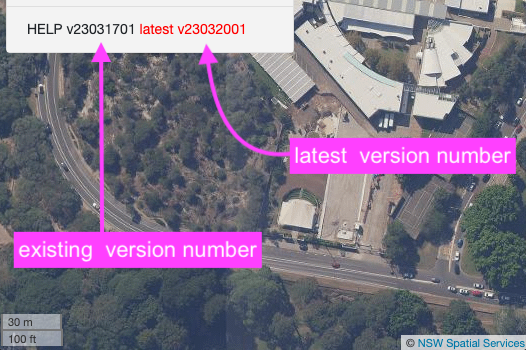
The version number of your Personal Console software is shown next to word Help
0
1
2
3
4
1
Help
1. Quick Start
---
--
2
Help
2. Get Support
---
--
3
Help
3. Mobile App
--
--
4
Help
4. UPDATE VERSION
---
--
Details available here .
Details available here .
For Android - Android Mobile Apps iOS Mobile Apps
This button will update Privacy Control to the latest version.
admin
January 15, 2026, 2:17am
9
With Community and Personal Aliases, Privacy Control will automatically check to see whether its version is up-to-date.
If the version is out-of-date, then the latest version will be displayed in red colour next to the current version number. To update simply call on the UPDATE VERSION button under the Help Menu.
If it is still not updated, please close the browser and re-open to force an update.
admin
January 15, 2026, 2:19am
10
Location: Download or Downloads folderyyyymmddhhmmss_aussydney_88io_xxxxxxxx.alias where
Location: Downloads folderyyyymmddhhmmss_aussydney_88io_xxxxxxxx.alias where
Area Applications -> Daily Map -> Location Files -> Save to Phone
Location: Download or Downloads folderyyyymmdd_xxxxxxxx_xxxxxxxxxxxxx.gpx where:
Location: Downloads folderyyyymmdd_xxxxxxxx_xxxxxxxxxxxxx.gpx where: