Introduction
Private Cyberspace's Secure Console can be used to protect both the users and the applications by isolating computing components (similar objectives to Qubes OS but with wider scope and implemented differently) to prevent unauthorised data access, modification and distribution.
Secure Console has NO learning curve for the end user, all secured applications simply appear inside a web browser. It can be inserted transparently into most existing IT environments, providing protection quickly at very low costs.
1. Design
Secure Console enforces Private Cyberspace's separation of powers principle by breaking the traditional end-user computing device into four separate easily audited hardware devices with simple software.
1.1. Browser Interface Device
Browser Interface is a dedicated user interface device. It is a low-cost stateless computer with NO storage:
- making it impossible for malware to infect.
- there is no data leak if stolen.
- simple to analyse and verify.
Currently based on Porteus Kiosk operating system - it strips the function of the physical user interface device down to the minimum required to run a web browser. In some cases there is a native helper application providing functions (e.g. access to device hardware) that are not available to web browsers.
1.2. System Image Device
System Image Device is a dedicated server for storing and serving operating system to boot up the Browser Interface Device setting up all operation parameters including communications with Access Gateway automatically.
Currently the industry standard Preboot Execution Environment (PXE) is used.
The public key of the image is published for image verification. After boot up the user of the Browser interface Device can verify the source of the running image by getting it to decrypt a random string encrypted with the image's public key.
1.3. Access Gateway Device
Access Gateway Device enables the web browser in the Browser Interface Device to access Application Services through remote desktop protocols like VNC and RDP. It also provides access control and session logging.
Currently the Access Gateway is based on Apache Guacamole - it eliminates all programmatic and data interfaces to the application, exposing only the required live human interface via remote desktop protocol like VNC and RDP (SPICE support should be available soon)
There are many ways to allow multiple RDP session on Windows 10 and 11:
1.4. Application Server Device
Application Servers are exposed to the Access Gateway via standard remote desktop protocols, giving the application complete control of the computing environment.
All applications are isolated from each other in either System Containers (e.g. LXC) or Virtual Machines (e.g. KVM). Remote web applications can be accessed by running a web browser on the Application Server.
Exploitation of vulnerability of an application (e.g. by malware or phishing) are isolated within that Application Server. Different application servers can be used for different applications e.g. one for visiting adult web sites and one for performing banking transactions. Sharing of an Application Server between multiple applications saves resources and is normally acceptable e.g. adult sites hacking each other.
2. Unique Features
In secure environments e.g. governments, banks etc. the 4 computers must be in 4 separate room under the control of 4 different parties.
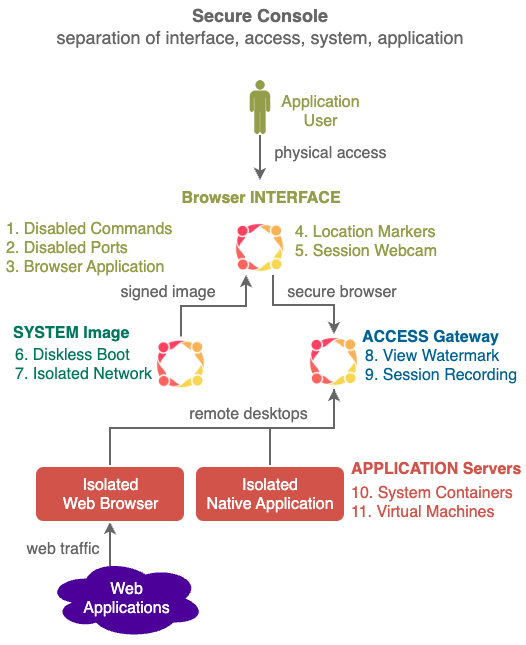
- Disabled Commands - Dangerous Commands are disabled (e.g. Screen Capture).
- Disabled Ports - Peripheral ports are disabled (e.g. WiFi port for networking, USB port for booting).
- Browser Application - Only one application available (e.g. a locked down Firefox Browser) no access to Operating System
- Location Markers - Submit of Location Markers (e.g. NFC, Bluetooth etc.) to confirm kiosk location.
- Session Webcam - Selfie webcam is turned on when needed to monitor reading of top secret information (e.g. detect recording by mobile phones).
- Diskless Boot - Ensures Kiosks always start in a well known state.
- Audited Storage - Scan storage for materials that should not be stored.
- View Watermark - Overlay viewer specific watermark on display screen to identify viewer should a photo of the screen is taken by viewer and leaked.
- Session Recording - the screen are recorded (e.g. using VNC) and encrypted for future review if necessary.
10 System Container - when there are a large number of Application Servers, System Containers can be used instead of Virtual Machine for Linux applications to conserve resources. - Virtual Machine -
2. Deployment Notes
2.1. View Watermark
Multiple layers of watermarks can be used to display a unique "view" for every viewing session - every time secret content is displayed.
-
Text Layer - text like random code, viewer name, viewing time, viewing location etc. can be layered on top of the content as watermark. Font size and type can be specific to each viewing session.
-
Image Layer - images like colour gradients spread out from random edges or from random points can be used to form a unique pattern in order to identify a specific viewing session.
All watermark are dynamic changing position, pattern, size and content.
The displayed pattern and screen area covered in flexible, a video might have a small watermark
View Watermarks can be Implemented with a number of ways in the Application Gateway, a simple method is just adding content on top to more elaborate methods like using Xlib to modify X buffer.
The View Watermark is stored securely on Fuzzy Blockchain to as proof of the viewing session.
2.2. Browser Interface Equipment and Workspace
- only x86 computers supported
- remove unnecessary peripherals
- disable dangerous in BIOS setting
- plug into ethernet with System Image device already running to boot up diskless automatically
- chassis intrusion detection recommended
- side monitoring of workspace recommended
- ceiling monitoring of room recommended
4. Personal Version
A personal version of Secure Console based on the linux mobile phone form factor is being developed.
Instead of 4 computers types in 4 separate rooms, Virtual Machine (VM) technology is used to create 4 independent virtual computers inside the mobile phone, each VM performing the same functions as the 4 computer types.
The VMs within the mobile phone are connected internally using linux bridging technologies.