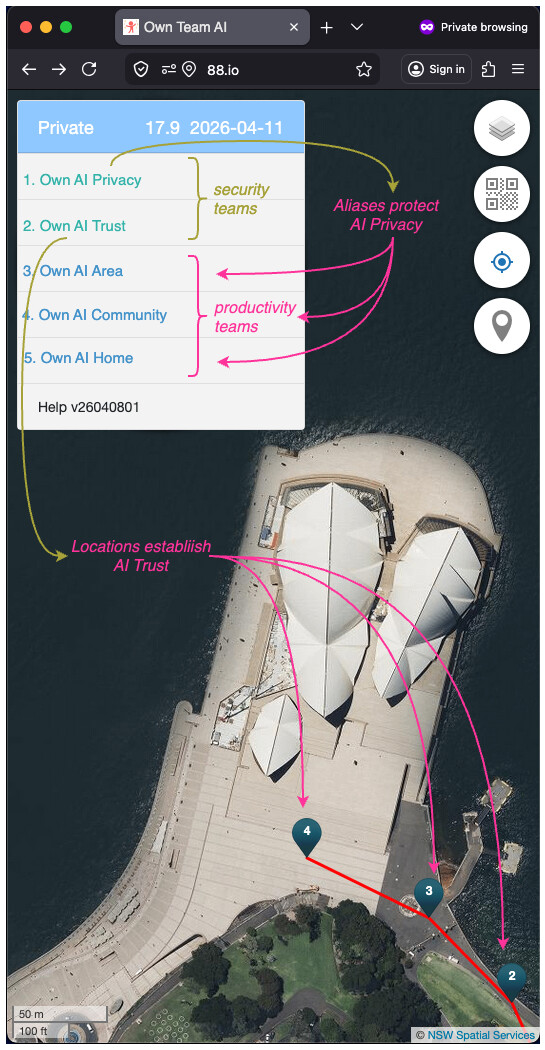
The Menu button is situated on the upper LEFT corner of Team Alias, there are also 4 round Action Buttons in the upper RIGHT corner.
Minimised Menu
1 - Menu Button
2 - Map Scale
3 - Background Map
4 - Camera Scanner
5 - Current Location
6 - Location Pins
7 - Map Copyright
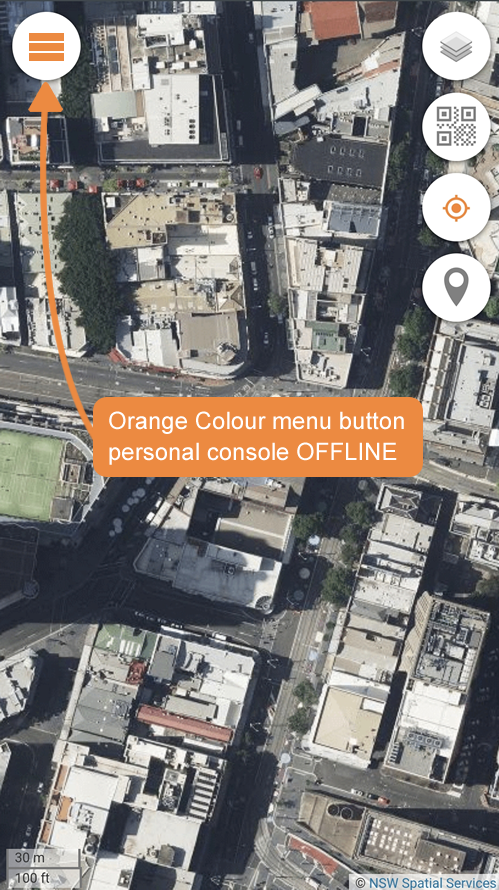
When the Team Alias is running OFFLINE (without internet access), the Menu Button turns from Grey to Orange.
Some functions (e.g. data collection) are still possible even when OFFLINE. For example, you are out of radio range or your phone in airplane mode.
By default, all Team Aliases start with a Private Alias. You can confirm the Alias type loaded by the word "Private" shown in the top of the menu.
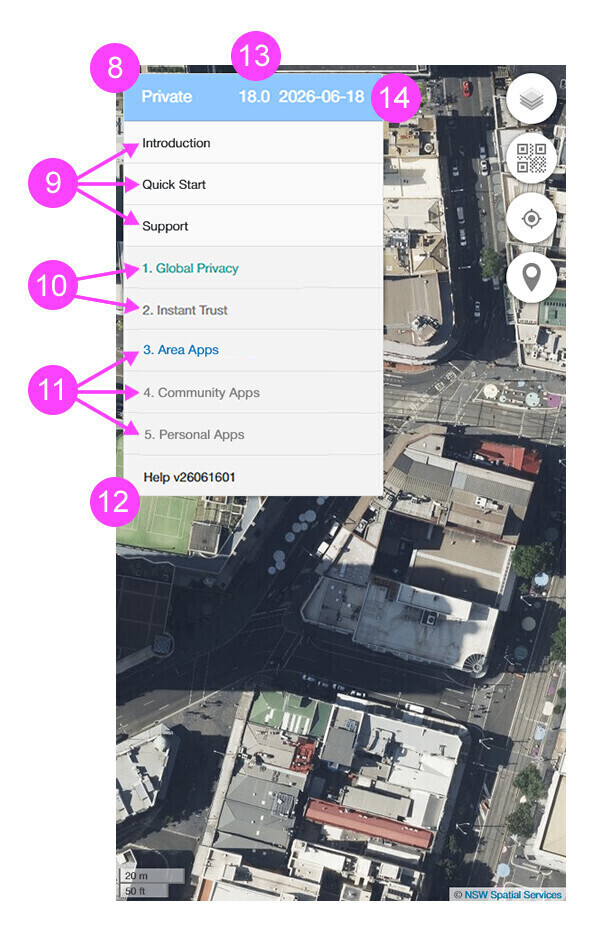
Private Menu
8 - Alias Type
9 - Outstanding Notifications
10 - Security Teams
11 - Productivity Teams
12 - Help Menu
13 - Map Zoom Level
14 - Date Displayed
Note in image of the Private Menu above:
There is a 9 - Outstanding Notifications section shown, indicating that there are 3 outstanding notifications. Simply click on them to read them and they will not appear again.
There are five Compute Team types preloaded into your Privacy Control, but initially only 2 of those types are activated. Their colours are no longer grey (either Green 10 - Security Teams or Blue 11 - Productivity Teams).
AI Privacy - activatedAI Trust Area AI - activatedCommunity AI Home AI
There is a "Help" button at the bottom of the menu showing you the version of your Alias Console. Click this Help Link for details.
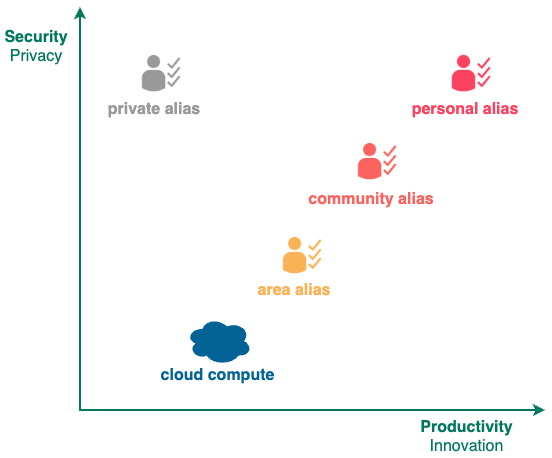
Currently there are 4 types of aliases, some aliases have more menu permissions (they can perform more operations) than others.
Private Alias has the least permissions
Area Alias has more permissions including all Private Alias permissions.
Community Alias has even more permissions including all Area Alias permissions.
Personal Alias has the most permissions including all Community Alias permissions.
Menu items listed below with the following symbols requires the following aliases:
Symbol
Alias
no symbol
Private Alias
~Area Alias
#Community Alias
^Personal Alias
Those menu items without the above symbols are available to ALL aliases.
Last updated on 20-Aug-2026.
Currently, there can be up to 3 independent Alias Teams defined to perform the Alias Function (Team A, Team B, Team C). Normally only Team A has active Team Domains predefined.
You can assemble an Alias Asset Teams by putting 9 Team Domains together.
0
1
2
3
4
5
1
Teams
Team A
Monitor
--
--
2
Teams
Team A
Payment
--
--
3
Teams
Team A
Phone
--
--
4
Teams
Team A
Support
--
--
5
Teams
Team A
Client
--
--
6
Teams
Team A
File
--
--
7
Teams
Team A
Ecosystem
--
--
8
Teams
Team A
Verification
--
--
9
Teams
Team A
Identity
--
--
10
Teams
Team A
STATUS
In Use
Idle
0
1
2
3
4
5
1
1. AI List
i. Create AI
--
--
--
2
1. AI List
ii. AI Management
Import AI
--
--
3
1. AI List
ii. AI Management
Import History
--
--
4
1. AI List
ii. AI Management
Export History
--
--
5
1. AI List
iii. AI Details
#Web Name#Submit --
6
1. AI List
iii. AI Details
# Hub Info
--
--
7
1. AI List
iii. AI Details
AI Keys
i. Encryption
Encrypt
8
1. AI List
iii. AI Details
AI Keys
i. Encryption
Decrypt
9
1. AI List
iii. AI Details
AI Keys
i. Encryption
Sign
10
1. AI List
iii. AI Details
AI Keys
i. Encryption
Verify
11
1. AI List
iii. AI Details
AI Keys
i. Encryption
Copy to Clipboard
12
1. AI List
iii. AI Details
AI Keys
i. Encryption
Encrypt Public Key
13
1. AI List
iii. AI Details
AI Keys
i. Encryption
Verify Public Key
14
1. AI List
iii. AI Details
AI Keys
ii. Hash
Hash
15
1. AI List
iii. AI Details
AI Keys
ii. Hash
Copy to Clipboard
16
1. AI List
iv. Alias Trust
--
--
--
17
1. AI List
v. Alias Scripts
--
--
--
0
1
2
3
4
5
1
2 . AI Applications
barcode
--
--
--
2
2 . AI Applications
calculator
--
--
--
3
2 . AI Applications
calendar
--
--
--
4
2 . AI Applications
encrypt
--
--
--
5
2 . AI Applications
image edit
--
--
--
6
2 . AI Applications
password
--
--
--
7
2 . AI Applications
qrcode
--
--
--
8
2 . AI Applications
token
--
--
--
0
1
2
3
4
5
1
#3 . AI Verification#i . Identity Verification#1 . Phone Number - Call In#Register --
2
#3 . AI Verification#i . Identity Verification#2 . Primary ISP - Browser Agent#Verify --
3
#3 . AI Verification#i . Identity Verification#3 . Email Address - Mail Out#Get Code--
4
#3 . AI Verification#i . Identity Verification#4 . Web Url#Verify --
5
#3 . AI Verification#i . Identity Verification#5 . Charge Card -Credit Card#Register --
6
#3 . AI Verification#i . Identity Verification#6 . Identity Card - AU Medicare Card#Submit --
7
#3 . AI Verification#i . Identity Verification#7 . Photo Card - AU Driver Licence#Submit --
8
#3 . AI Verification#i . Identity Verification#8 . National Passport - AU Passport#Submit --
9
#3 . AI Verification#i . Identity Verification#9 . Common Phone Number#Verify --
10
#3 . AI Verification#ii . Location Verification#1 . Night Block#Submit --
11
#3 . AI Verification#ii . Location Verification#2 . Day Block#Submit --
12
#3 . AI Verification#ii . Location Verification#3 . Local ISP - Browser Fingerprint#Verify --
13
#3 . AI Verification#ii . Location Verification#4 . Device Verification#Verify --
14
#3 . AI Verification#ii . Location Verification#5 . Last Home Verification#Submit --
15
#3 . AI Verification#ii . Location Verification#5 . Last Home Verification#hub .quu--
16
#3 . AI Verification#ii . Location Verification#5 . Last Home Verification#hub .aunsw--
17
#3 . AI Verification#ii . Location Verification#6 . Last Work Verification#Submit --
18
#3 . AI Verification#ii . Location Verification#6 . Last Work Verification#hub .quu--
19
#3 . AI Verification#ii . Location Verification#6 . Last Work Verification#hub .aunsw--
20
#3 . AI Verification#ii . Location Verification#7 . Last Scan Verification#Submit --
21
#3 . AI Verification#ii . Check Verification#Phone #Search --
22
#3 . AI Verification#ii . Check Verification#Common Phone#Search --
23
#3 . AI Verification#ii . Check Verification#Basic Location#Search --
24
#3 . AI Verification#ii . Check Verification#Browser #Search --
25
#3 . AI Verification#ii . Check Verification#Credit Card#Search --
26
#3 . AI Verification#ii . Check Verification#Day Block#Search --
27
#3 . AI Verification#ii . Check Verification#Driver Licence#Search --
28
#3 . AI Verification#ii . Check Verification# Email
#Search --
29
#3 . AI Verification#ii . Check Verification#Last ISP#Search --
30
#3 . AI Verification#ii . Check Verification#Medicare #Search --
31
#3 . AI Verification#ii . Check Verification#Night Block#Search --
32
#3 . AI Verification#ii . Check Verification#Passport #Search --
33
#3 . AI Verification#ii . Check Verification#Primary ISP#Search --
34
#3 . AI Verification#ii . Check Verification#Home Door#Search --
35
#3 . AI Verification#ii . Check Verification#Home Wifi#Search --
36
#3 . AI Verification#ii . Check Verification#Region #Search --
37
#3 . AI Verification#ii . Check Verification#Venue #Search --
38
#3 . AI Verification#iv . Show Verification#Phone #Goto --
39
#3 . AI Verification#iv . Show Verification#Browser #Goto --
40
#3 . AI Verification#iv . Show Verification#Credit Card#Goto --
41
#3 . AI Verification#iv . Show Verification#Driver Licence#Goto --
42
#3 . AI Verification#iv . Show Verification# Email
#Goto --
43
#3 . AI Verification#iv . Show Verification#Medicare #Goto --
44
#3 . AI Verification#iv . Show Verification#Passport #Goto --
45
#3 . AI Verification#iv . Show Verification#Residence #Goto --
46
#3 . AI Verification#iv . Show Verification#Basic Location#Goto --
47
#3 . AI Verification#v . Item Count#All #Submit --
48
#3 . AI Verification#v . Item Count#Call #Submit --
49
#3 . AI Verification#v . Item Count# Email
#Submit --
50
#3 . AI Verification#v . Item Count#Pin #Home Local#Submit
51
#3 . AI Verification#v . Item Count#Pin #Home Venue#Submit
52
#3 . AI Verification#v . Item Count#Pin #Work Local#Submit
53
#3 . AI Verification#v . Item Count#Pin #Work Venue#Submit
54
#3 . AI Verification#v . Item Count#Verify #Phone #Submit
55
#3 . AI Verification#v . Item Count#Verify #Browser #Submit
56
#3 . AI Verification#v . Item Count#Verify #Credit Card#Submit
57
#3 . AI Verification#v . Item Count#Verify #Driver Licence#Submit
58
#3 . AI Verification#v . Item Count#Verify # Email
#Submit
59
#3 . AI Verification#v . Item Count#Verify #Medicare #Submit
60
#3 . AI Verification#v . Item Count#Verify #Passport #Submit
61
#3 . AI Verification#v . Item Count#Verify #Residence #Submit
62
#3 . AI Verification#v . Item Count#Verify #Basic Location#Submit
63
#3 . AI Verification#v . Item Count#Verify #Scan #Submit
64
#3 . AI Verification#v . Item Count#XMPP #Submit --
0
1
2
3
4
5
1
#4 . AI Wallet#i . Bronze Coin#Key #Delete --
2
#4 . AI Wallet#i . Bronze Coin#Key #Add --
3
#4 . AI Wallet#i . Bronze Coin#Address --
--
4
#4 . AI Wallet#i . Bronze Coin#Signature #Delete --
5
#4 . AI Wallet#i . Bronze Coin#Signature #Add --
6
#4 . AI Wallet#i . Bronze Coin#Chain --
--
7
#4 . AI Wallet#i . Bronze Coin#Private Key--
--
8
#4 . AI Wallet#ii . Silver Coin#Charge Credit Card#Charge --
9
#4 . AI Wallet#ii . Silver Coin#Transfer Credit#Send & Tokenize--
10
#4 . AI Wallet#ii . Silver Coin#Transfer Credit#Clear --
0
1
2
3
4
5
1
#5 . AI Interaction#i . Alias Text#Send --
--
2
#5 . AI Interaction#i . Alias Text#Receive --
--
3
#5 . AI Interaction#ii . Alias Notification#Create --
--
4
#5 . AI Interaction#ii . Alias Notification#Status #Submit --
5
#5 . AI Interaction#iii . View Image#Submit --
--
6
#6 . Qr Log#Submit
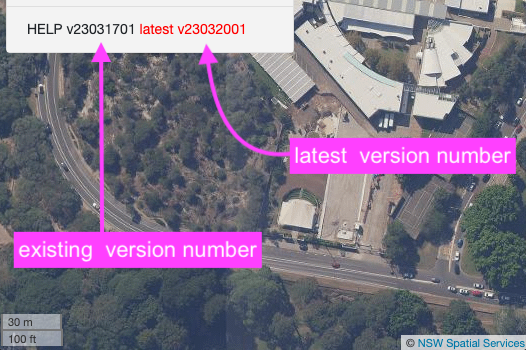
The version number of your Personal Console software is shown next to word Help
0
1
2
3
4
1
Help
1. Quick Start
---
--
2
Help
2. Get Support
---
--
3
Help
3. Mobile App
--
--
4
Help
4. UPDATE VERSION
---
--
Details available here .
Details available here .
For Android - Android Mobile Apps iOS Mobile Apps
This button will update Privacy Control to the latest version.
admin
January 15, 2026, 2:17am
9
With Community and Personal Aliases, Privacy Control will automatically check to see whether its version is up-to-date.
If the version is out-of-date, then the latest version will be displayed in red colour next to the current version number. To update simply call on the UPDATE VERSION button under the Help Menu.
If it is still not updated, please close the browser and re-open to force an update.
admin
January 15, 2026, 2:19am
10
AI Privacy -> AI List -> AI Management -> AI ID -> Save Alias
Location: Download or Downloads folderyyyymmddhhmmss_aussydney_88io_xxxxxxxx.alias where
Location: Downloads folderyyyymmddhhmmss_aussydney_88io_xxxxxxxx.alias where
Area AI -> Daily Map -> Location Files -> Save to Phone
Location: Download or Downloads folderyyyymmdd_xxxxxxxx_xxxxxxxxxxxxx.gpx where:
Location: Downloads folderyyyymmdd_xxxxxxxx_xxxxxxxxxxxxx.gpx where: