138813.au

Phone Portal

The 138813.au team provides a phone portal for Compute Owners in Australia, giving them an alternative communication channel to complement the dominant Internet based communications.

1. Overseas Uses

As part of the Team Incubator program, services available on phone number 138813 to Australian are also available to people calling from overseas to the phone number +612 8002 000.

2. Unlimited Calls

Currently the 138813 phone number has a call limit of one call per day from within Australia, for unlimited calls from within Australia, please dial +61 2 8002 0000 instead.

3. Portal Functions

Currently the 138813.au phone portal supports the following functions:

  1. Area Alias
    create an alias protect your identity with just one call.

  2. Voice Command
    issue personal commands using your own voice.

  3. Global Service
    access large numbers of single sign-on services worldwide.

  4. Number Link
    create a web presence instantly with your phone number.

1. Create Alias

The first step in becoming a Compute Owner is to protect your online identity by creating an Alias.

Area Alias adds an application independent layer of protection (to complement traditional cybersecurity protection from cloud compute) that only you have control of.

Create Primary Area Alias

138813.au enables you to create an unique Area Alias that is secured by your home region, your web browser, your network provider and your phone number in 3 simple steps that takes only seconds.

Create Secondary Area Aliases

The primary Area Alias you have created by calling into 138813 is to be used on your personal Mobile Phone.

Using that SAME personal phone number, you can create TWO more Area Aliases for your other personal console devices (that do NOT have mobile phone numbers) e.g. one for your laptop and one for your desktop computer.

Note instead of receiving an SMS you will receive an email from agent@138813.au to your first Area Alias's email box e.g. randomnumber@aunsw.88.io

2. Issue Voice Commands

After you have created an Area Alias with au.88.io, you can call into 138813 to issue phone commands to au.88.io's entity agent.

Voice Commands

The caller enters the phone number in the identity verification menu, and calls 138813 from that phone number within 1 minute. If the number matches, the caller will hear "Phone number has been verified. Thank you."

If the number doesn't match, or the caller calls after 1 minute, they will be directed to the non member menu.

Step 1

The caller is prompted "Please say the command after the beep"

The caller can say one of the 9 commands:

  1. Emergency
  2. Hazard
  3. Advertisement
  4. Recommendation
  5. Creation
  6. News
  7. Active
  8. Passive
  9. Junk

If no valid command is detected afterwards, the caller is prompted again with "No valid detection, please try again". If still no valid detection after 3 times, the caller is prompted to use keypad to enter the command.

If a valid command is detected, playback "Is it ${detected_command}?". The caller has to say Yes or No. If the caller says no, or no valid detection. The caller is prompted with "No valid detection, please try again" for up to 3 times, before they are prompted "Yes, press 1. No, press 2".

Step 2

If the command detected is "junk", prompt the caller "Please say the phone number you wish to report as spam after the beep".

The caller is expected to say the phone number they wish to report, each digit must be pronounced in international dial format, shortcuts for repeating numbers like "double" or "triple" will not work.

Once the caller stops speaking for 2 seconds, the number will be detected by whisper. If no numbers are detected, the caller is prompted with "No valid detection, please try again" for up to 3 times, before they are prompted to enter the number via keypad.

If the numbers are detected, or entered by keypad, playback "Is it ${detected_number}?" The caller has to say Yes or No. If the caller says no, or no valid detection. The caller is prompted with "No valid detection, please try again" for up to 3 times, before they are prompted "Yes, press 1. No, press 2".

Pending on the availability of an API, the spam number is posted to hub.aunsw.88.io.

Step 3

If the other commands are detected, prompt the caller "Please say the full region name after the beep".

The caller can say one of the seven states in Australia:

  1. NSW
    New South Wales

  2. VIC
    Victoria

  3. QLD
    Queensland

  4. WA
    Western Australia

  5. TAS
    Tasmania

  6. NT
    Northern Territory

  7. ACT
    Australian Capital Territory

If no valid state is detected afterwards, the caller is prompted again with "No valid detection, please try again". If still no valid detection after 3 times, the caller is prompted to use keypad to enter the state.

If a valid state is detected, playback "Is it ${detected_state}?". The caller has to say Yes or No. If the caller says no, or no valid detection. The caller is prompted with "No valid detection, please try again" for up to 3 times, before they are prompted "Yes, press 1. No, press 2."

Step 4

The caller is prompted "Please record details".

Once the recording finishes, it is sent to whisper to detect the text.

The caller is then pompted "Do you want to include the audio file in the submission?"

If the caller says "No", the whisper text response, the command, the caller and callee phone numbers, the location detected and the current timestamp will be posted to hub.aunsw.88.io.

If the caller says "Yes", their recording file is also posted together with the above to hub.aunsw.88.io.

If the callee number is +61138813, and the caller number has posted once on that day already, playback "You have called 138813 today already, please call 61499331111 for additional submissons, or try again tomorrow".

Step 5

Playback "Your details have been submitted. Thank you."

  1. Optionally create your own Voice Model
    First time you can use a Public voice model to recognise your speech and create your personal voice model if it does not work for you within the SAME call.

138813.au enables rapid creation of Area Aliases that are trusted by other compute owners. Under the protection of your Alias Alias, you can start participating safely in Team Compute worldwide.

3. Verify Phone Number

  1. Integrated Verification
    verify your phone number, region, network and browser by calling into 138813 without exposing your number to online applications.

4. Alternative Phone Numbers

The 138813 phone portal is available on a number of secondary phone number to suit different caller types.

Global Phone Numbers

As a Phone Portal for the Australia entity.

Phone Agent for an Country Entity (Australia), 138813 is not supposed to be reachable overseas, but as part of the global Citizen Startup program, 138813 is currently accepting calls from outside of Australia.

Caller Number Language Daily Limit Release
Global +61 138813 English 1 call 26.02
Global +61 2 8002 0000 English 100 calls 26.02

All phone numbers above are currently online and expected to reach maturity by the release month listed.

Access to these Global Phone Numbers from countries that have their own Citizen Ecosystem fully deployed will be terminated. A service migration notice will be played to callers from those countries for a minimum duration of 6 months to facilitate migration before termination of service.

+61 138813

The 138813 phone number can be remembered and communicated to others easily, but it might not be reachable from some phones overseas and is too expensive for frequent calls.

1.2. +61 2 8002 0000

When possible, please call the equivalent +612 8002000 phone number, which has a higher daily call limit for individual caller phone number (100 calls a day for each caller phone number).

2. Local Phone Numbers

Due to cost, legal and security reasons Phone Agents for Area Entities should not service phone numbers from outside their native countries.

The following local phone agents are being developed to handle phones from those specific countries ONLY. Please contact us if you would like a local phone agent in your country as well.

Caller Number Language Calls Daily
Australia +61 2 8002 0009 Mandarin 100 calls
China +852 5808 4846 Mandarin 1 call
United States +1 646 661 3336 English 1 call

All numbers above are currently online and expected to reach maturity by the release month listed.

2.3. +1 646 661 3336

Until the United States Citizen Ecosystem is full deployed, we are using the phone number +1 646 661 3336 in New York for the development Phone Agent.

4. Australian Phone Numbers

The 6 digital phone number 138813 is nice and easy to remember but it is very expensive to use, so currently we have put a call limit to 1 call a day.

For UNLIMITED calls you can use, our Language Specific phone numbers:

  1. English Phone Number +612 8002 0000
  2. Chinese Phone Number +612 8002 0009

Beside having longer phone number and different language options, the functions of the above language specific numbers are the SAME as the functions on 138813.

English

From an Australian phone number, please call +612 8002 0000

The above phone number should understand all English accents, but please post under partition ai if you experience problems.

Overseas Phone Numbers

Traditionally Area Entity Phone Numbers should only answer calls from within that entity, but since 138813.au belongs to the Citizen Startup program, people overseas can call these Overseas Numbers to test some of 138813.au's functions:

  • English: +1 646 661 3336 (New York, United States of America)
  • Chinese: +852 5808 4846 (Hong Kong, China)

Overseas Numbers are special, only available during the Citizen Startup phase and the Entity Agent will NOT ask for the Australian State or Australia Council you are currently in.

Please post HERE to tell us what other countries you want us to deploy extra Overseas Numbers in.

English

From any non- Australian phone number, please call +1 646 661 3336

The above phone number should understand all English accents, but please post under partition ai if you experience problems.

Chinese

From any non-Australian phone number, please call +852 5808 4846

The above phone number should understand both Mandarin and Cantonese, but please post under partition ai if you experience problems.

The following are current defaults:

  1. Characters used are 简体字 (instead of 繁體字 etc.)
  2. Mandarin is translated to 普通话 (instead of 国语, 华语 etc.)
  3. Cantonese is translated to 广东话 (instead of 粤语, 广府话, 广州话 etc.)

Notes

For Citizen Timeline posts:

There will be put posted using a special 138813.test account with location srcarea value set as g_overseas and will be deleted after one week.

6. Create Primary Area Alias - Step 2

After your call into 138813 above, a web link (e.g. https://138813.au/randomnumber) will be created.

Step 2 involves you receiving a short SMS from 138813 with that web link. For example:

Thank you for calling 138813,
please click on
https://138813.au/randomnumber
to continue.

Click on the web link (e.g. https://138813.au/randomnumber) to proceed to Step 3 which involves visiting that newly created web page for your phone number.

7. Create Primary Area Alias - Step 3

Step 3 involves visiting the 138813.au web site created from your phone number e.g.

[138813.au/randomnumber](https://138813.au/randomnumber)

Once you clicked on the 138813.au web link in the SMS or typed in the web page on your web browser, your Personal Console will be loaded into your web browser. You can then continue with Step 2 using your Personal Console in your web browser .

1. Region Verified

After your Personal Console has been loaded, it will proceed to verify the Region you are currently in using data from 3 different sources.

Once your region has been verified by those 3 different sources to be the SAME:

  1. Speech Region - the region you say during your call to 138813
  2. IP Region - the region detected from your IP Address.
  3. Web Region - the region detect by your Web Browser

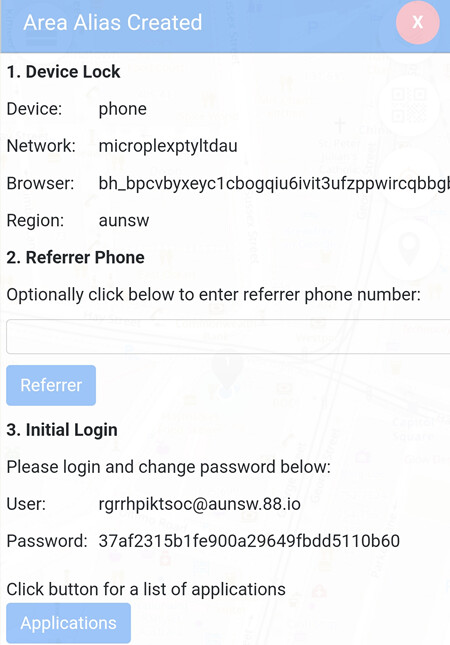
An Area Alias Created message will pop-up on your Personal Console.

On the "Area Alias Created" notification, you have the opportunity to enter the phone number of the person who helped you with or referred you to compute ownership.

This is just for the record, as Area Alias do not have Interval Coin Wallet, it is up to the Community Entity that you will be joining

The person must have an Area Alias already and given you permission to enter their phone number as referrer.

You must have the permission of that person to enter the phone number and make sure to ask for permission to use their phone number this way from that person. This will give both of you opportunity to earn Interval Coin for this introduction activity.

Only when either of you has a Community Alias, can the Referrer Bonus be claimed.

Note:
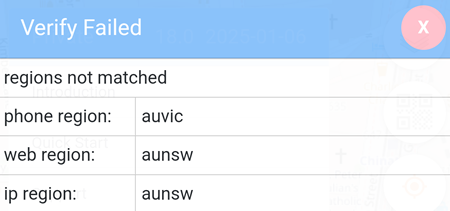
If any of the region does not match to the other two regions, the device verification will fail.

In the example below, the phone region is auvic where the web region and the ip region are aunsw.

3. Map Pin

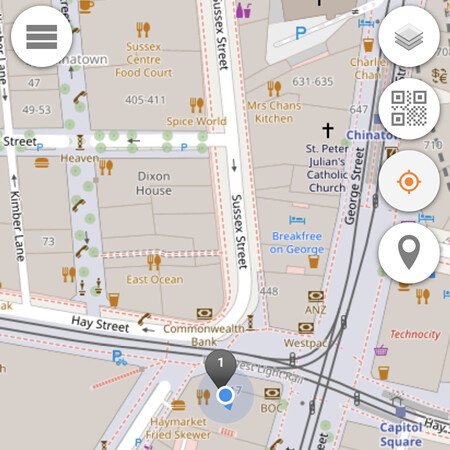
The Area Alias creation process is completed when a Grey Pin is placed on the map of your Personal Console.

4. Timeline Confirmation

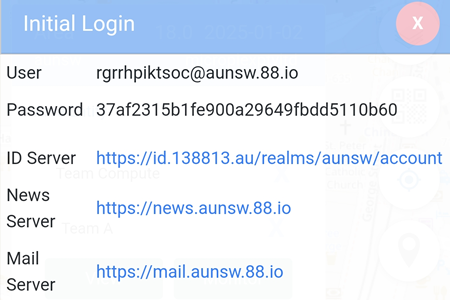
The Identity Server is displayed In Area Entity -> Entity Agent -> Agent A -> Application menu.