Privacy Control

Easy Privacy Software

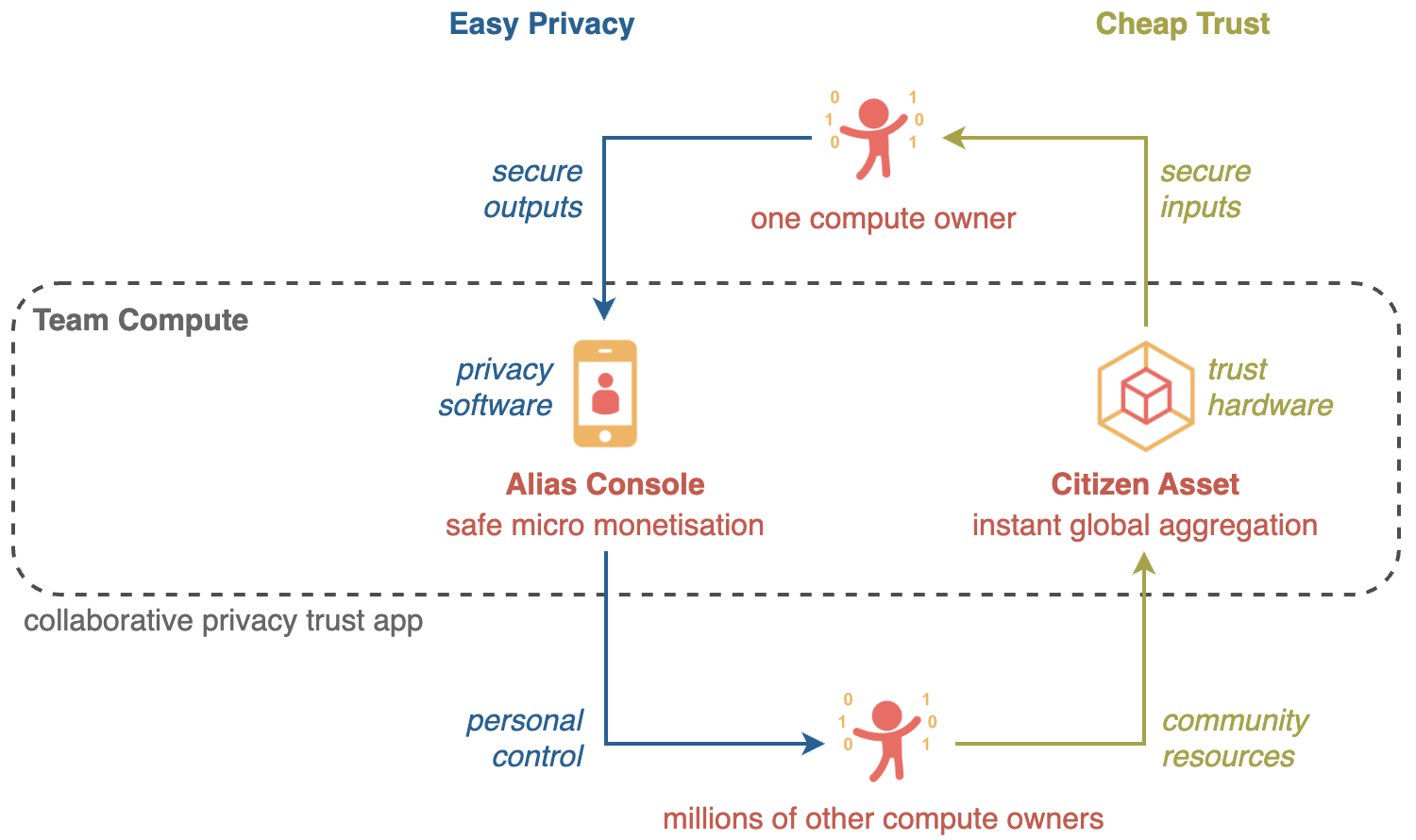
Team Compute consists of privacy software and trust hardware.

Privacy Control is the privacy software that boosts your PRIVACY by using different aliases online in different situations.

1. Easy Installation

Install Privacy Control into your web browser with just ONE CLICK.

  • NO download from App Stores or Play Store
  • NO sign-up to any service or create any account
  • NO contacts e.g. username, email, phone number etc. needed
  • NO advertisement or any unsolicited interruption
  • NO leaking of data from your device
  • NO charge for use, distribution, modification (refer to license)
  • NO hidden operation (source code is published publicly)

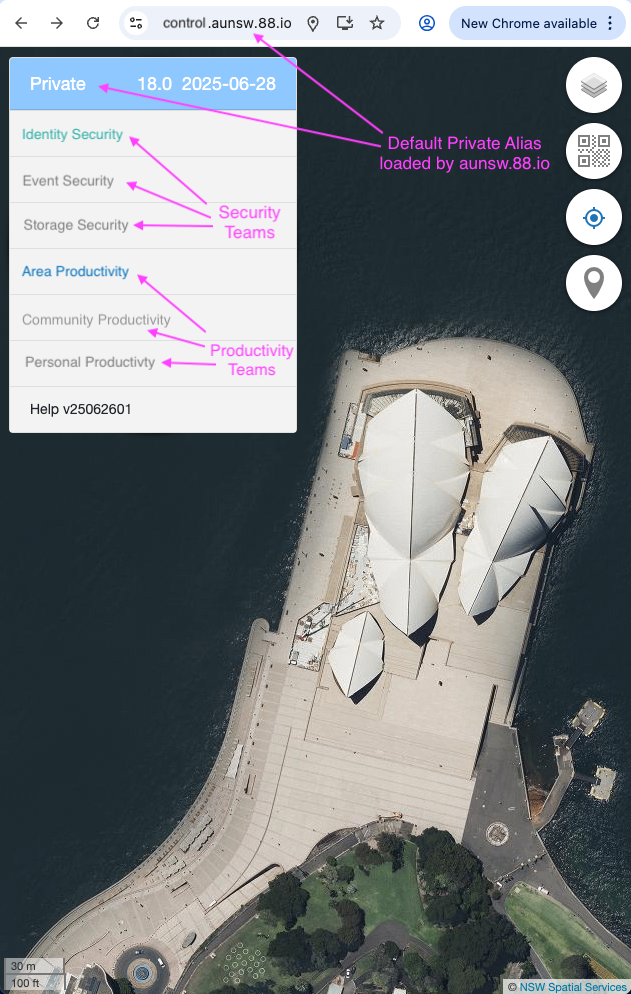
You can source your Privacy Control from any team of your choice, by default Privacy Control will install from the Area Team closest to you (e.g. aunsw.88.io) with some demo teams preloaded so it will start working for you immediately.

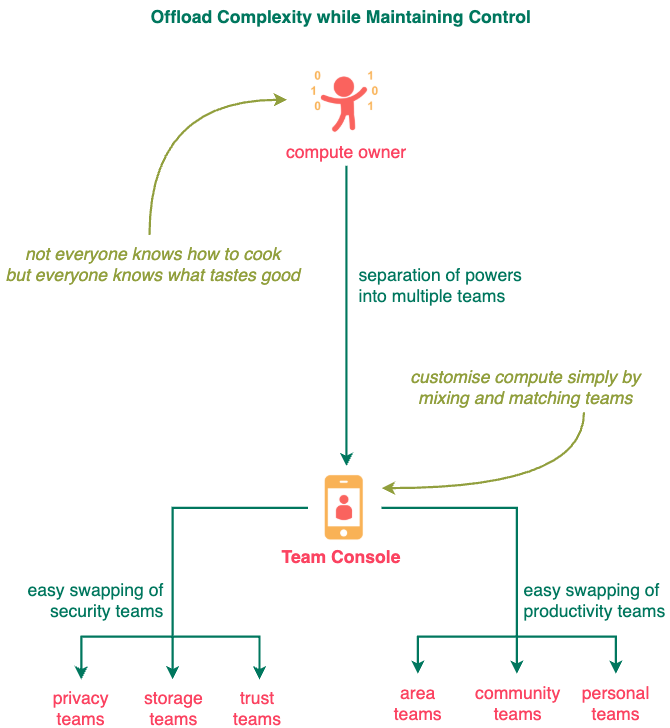
As shown above, 6 sets of teams are preloaded in console.aunsw.88.io but only 2 sets of teams (Privacy Teams and Area Teams) are activated initially.

2. Easy Usage

Team Console removes the SKILL barriers to Compute Ownership. NO technical skill is required to benefit from Compute Ownership.

Experience how EASY it is to become a Compute Owner through Team Compute by following our Quick Start program:

  1. Team Security
    see how much safer is Team Compute in handling spam emails compared to Cloud Compute.

  2. Team Productivity
    see how much faster is Team Compute in creating digit assets compared to Cloud Compute.

After installation, you can create your first piece of Information Asset in your Private Cyberspace by following the One Second Collect tutorial in the Quick Start Guide.

  1. Private Cyberspace Introduction
  2. Private Cyberspace Quick Start
  3. Private Cyberspace User Guide

To maintain Private Cyberspace's security model, you MUST only run the Private Cyberspace software on personal devices that you own - hardware that you have EXCLUSIVE and FULL control of.

No Skill Barrier

(create aliases for different situations, define your own transactions, train your personal AI, sell insights from private data etc.)

Personal Console puts a personal app store on EVERY PHONE. Anyone (from children to retirees) can customise one's cyberspace easily by mixing and matching application modules like playing with toy bricks.

Everyone (from children to retirees) can take the CONTROL of their digital lives back from cloud platforms and easily customise their private cyberspaces by simply swapping modules like playing with toy bricks.

Personal Console enables non-technical individuals to own and shape their digital environments independently by simply mixing and matching compute modules. Not everyone knows how to cook, but everyone knows what tastes good.

Private Cyberspace gives you exclusive CONTROL of your information space (e.g. create aliases for different situations, define your own transactions, train your personal AI, expand your income mix etc.). Start creating value and building asset using your phone within just ONE SECOND.

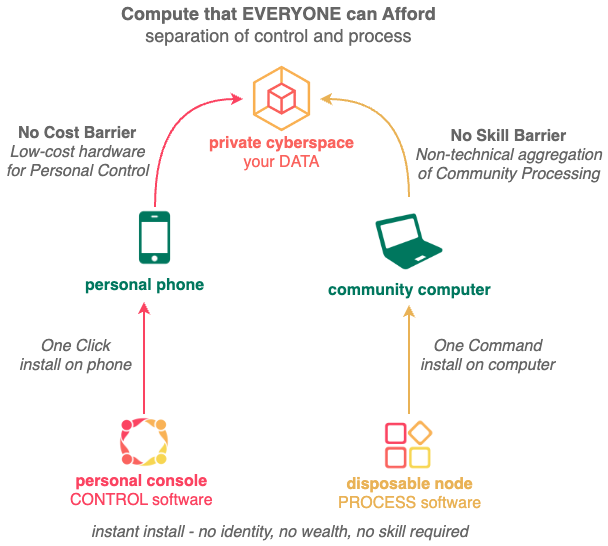
Private Cyberspace make it affordable for you to import compute to process your data instead of having to export your data to cloud platforms for processing, by enabling you to leverage the latent processing power of thousands of community computers worldwide from the comfort of your personal phone.

Become an OWNER instead of user of the latest applications (AI, blockchain etc.).

This separation of CONTROL (using Private Cyberspace software on personal phone) from PROCESS (using Disposable Node software on community computers) is a paradigm shift from traditional monolithic computing where everything is done centrally on Cloud Platforms.

1.2. Console Security

To maintain Private Cyberspace's security model, you MUST:

  1. Run the Private Cyberspace software on personal devices that you own - hardware that you have EXCLUSIVE and FULL control of.

  2. Dedicate a web browser just for Private Cyberspace (e.g. Chrome on Android and Safari on iOS) and use a different web browser (e.g. Firefox, Edge etc.) for visiting your other web sites.

Do More

The Personal Console "Quick Start" program has 2 steps, Step 2 shows you how to break the Cloud Bottleneck to Do More than ever before.

2. Experience the Ownership Difference

Afterwards you can protect yourself immediately and contribute to the community easily by following the Quick Start Guide:

  1. COLLECT your first piece of information asset privately into your cyberspace within one second.
  2. EARN your first coin by contributing information anonymously (from potholes on the road to active shooter in the building) with a few clicks.
  3. PROTECT your phone numbers and email addresses from scammers and spammers with a simple forwarding.
  4. STORE your data reliability and securely with a simple forwarding.

Besides the Quick Start Guide linked to above, a Full User Guide is available HERE.

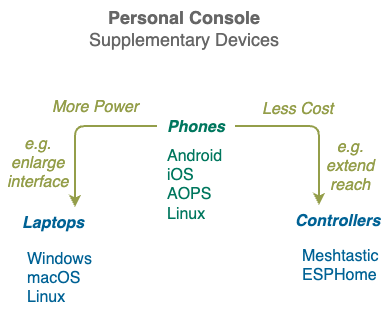
2.1. Supplementary Devices

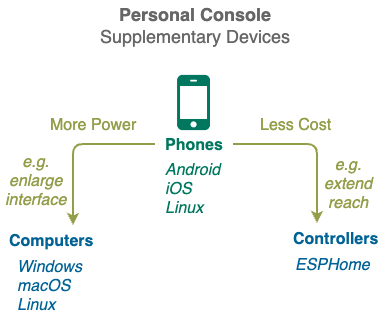
After you gained some experience the Personal Console on your phone, you can optionally extend it with more personal devices.

Personal Console Computers gives you more compute power as well as bigger screens and keyboards to enjoy your cyberspace in comfort. Most computers with web browsers (e.g. laptops, desktops and even TVs) can be used. The only condition to running Personal Console software on your device is that you must have exclusive control of it.

Personal Console Controller gives you unprecedented power in monitoring and controlling the physical world by letting you sprinkle low-cost low-power sensors and actuators around your environment. The more controllers you deploy, the bigger your cyberspace footprint and the more opportunities to sell its capabilities to other cyberspaces.

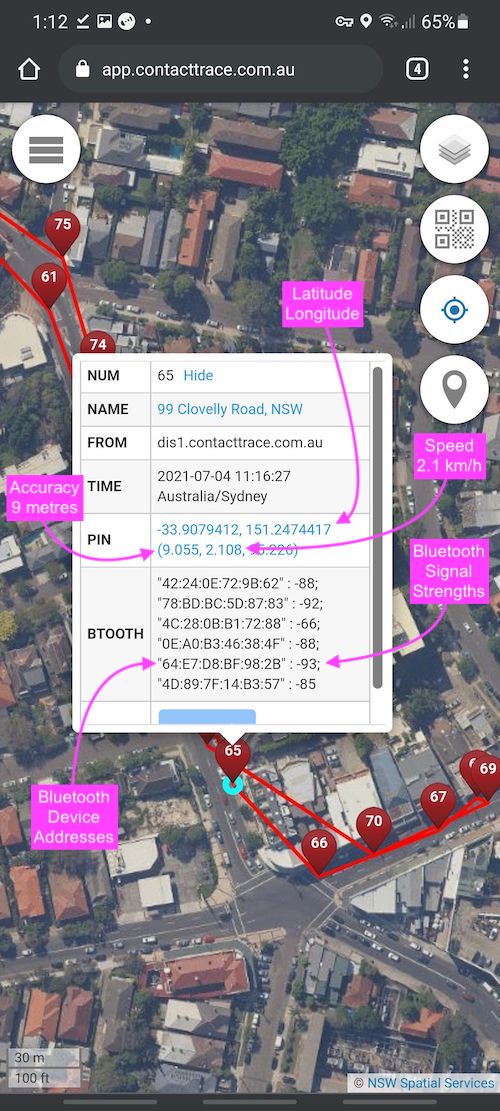
Above screen capture of a Personal Console shows a walk to the local bakery, notice some information collected about the owner (walking speeds) and the surrounding environment (bluetooth signals). Unlike a normal online map, the red pins above stores much more information - in fact they store EVERYTHING . . .

2.1. Space Time Blocks

One ease of use innovation Private Cyberspace has is enabling non-technical folks store EVERYTHING in simple Space Time Blocks - records of every phone call, photos of every meal, barcodes of every purchase, wifi signals of every neighbour, visits to every web site ... there is no limit on what data the numerous sensors on the phone and on the controllers can collect.

Space Time Blocks let you collect as much data as possible into your Private Cyberspace and then let your own private Artificial Intelligence sort them out later. Those that remains can then found using your own private Search Engine.

What is NOT shown above are private information that only you should have access to (e.g. how many times have you worn THAT dress) and public information

is the from how many times you haave to safety alerts like contaminated food you have recently purchased to an active shooter in the building

The ONE SECOND collection of your location is just a start, built-in sensors let you collect unprecedented amount of data easily on your phone for your OWN private use e.g. your movements throughout the day, neighbours' wifi signals, friends' bluetooth headset signals, rapid antigen test results, product barcodes, cafe QR codes, shopping receipts etc.

2.2. Personal Console Applications

Private Cyberspace removes the SKILL barrier to SECURE application by rewarding assistances provided to others (no matter how small) and enabling everyone to control their applications and infrastructures easily through mixing and matching computing nodes (like toy bricks) without technical knowledge.

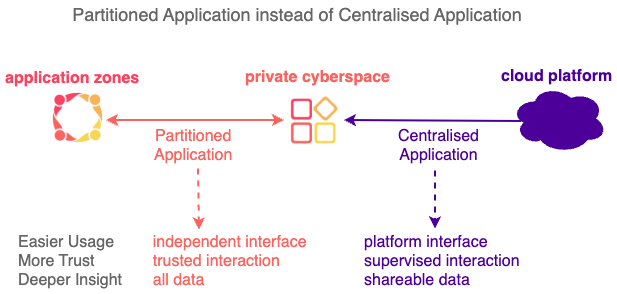
Centralisation is about a few protecting many others, while Partitioning is about many protecting themselves.

Supplementary Devices

Once the Private Cyberspace software has been installed on your phone, you can optionally add more personal devices to it to improve your Private Cyberspace experience.

Easy touch and speech mobile interface for management of Compute Assets.

Intro

Personal Console facilitates easy management of insecure applications. Non-technical individuals can shape their digital lives by CONTROLLING latest applications (AI, blockchain etc.) from many sources safely, gaining Insights, Incomes, Impacts not possible with Cloud Applications.

Personal Console Phone

Personal Console takes advantage of the numerous sensors on your mobile phone to help you build valuable information assets quick by collecting as much data about yourself and your environment into your Private Cyberspace.

The front page is a daily map (like a diary that writes itself) and shows where you are right now as well as data you have collect on that date so far.

It is the first software in the world supporting geo cyber fusion so you can use it to see not just where you have been geographically in the physical world but also where you been on the internet in the virtual world.

Below is an image of a Personal Console showing a walk to the local bakery and all the valuable radio signals have been collected at each point.

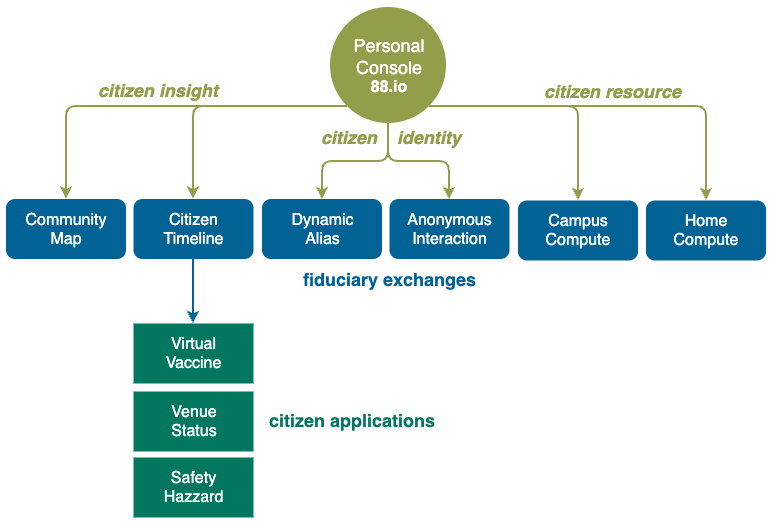
Combining analog and digital data gives you unprecedented situation awareness that is valuable for both you and your community. Check out the Citizen Timeline app in your Personal Console and see how the past and real-time data you collect can improve your local community in ways not possible before.

Personal Console can run on most hardware devices that Private Cyberspace owner has full physical control of e.g. phones, laptops, pagers.

Cross Platform

Just ONE CLICK is needed to turn a computing device into a Console Device.

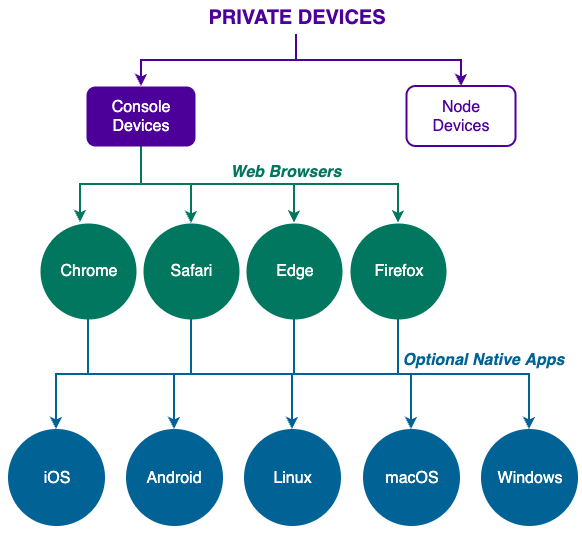
To enable maximum coverage across different devices, Private Cyberspace's main user interface (the Personal Console) is web browser based.

1. Device Support

Currently the following user devices are supported in the operation of Private Cyberspaces:

  1. Apple iOS
    iOS User Guide

  2. Google Android
    Android User Guide

  3. Microsoft Windows

  4. Apple macOS

  5. Linux

2. Dual Browsers

It is recommended to use at least 2 web browsers on your device to separate your Private Cyberspace web traffic with your other web traffic.

For those with stronger security requirements, the 2 web browsers should be ran inside separate virtual machines (e.g. Virtual Box) and not directly on the device itself.

2.1. Private Web Browser

Currently the following web browsers are recommended to be used with Private Cyberspace:

  • Safari for iOS and macOS
  • Chrome for Android, Windows and Linux

2.2. Public Web Browser

Currently Firefox is the recommended web browser to be used OUTSIDE of Private Cyberspaces.

Suggest Plugins for Firefox:

Dual Web Browsers

For maximum cross platform compatibility without needing to go through app stores, your AI Console runs inside web browsers.

Privacy Cyberspace traffic are mostly encrypted, transmitted on private IP addresses with anonymous identities.

You should run at least TWO separate browsers on your device.

1. Primary Browser

Dedicate one web browser (e.g. Chrome or Safari) on your device to your Private Cyberspace accesses. Unless absolutely necessary, do NOT install any addons, extensions, plugins etc. on this browser.

You may also access some highly trusted external web sites (e.g. banking, government) with this browser, although ideally they should be accessed separately using a third browser.

2. Secondary Browser

Use a different web browser (e.g. Firefox and Edge) available on your device to access other web sites, privacy is very important with this browser as you will be using it across many sites. Pick browsers that have features like containers, no script etc.

3. Virtual Machine Isolation

If you have a fast laptop with at least 8Gbyte RAM, you can run your secondary browser inside a virtual machine like Virtual Box for extra security.

To make things easy, we have created ONE COMMAND deployment for such a Secondary Browser Virtual Machine on Windows and macOS.

Personal Console Computer

Personal Console Computers can be any computer with a web browser, so it can also be a laptop, a desktop or even a TV. The only condition to running Personal Console software is that you must have exclusive control of it.

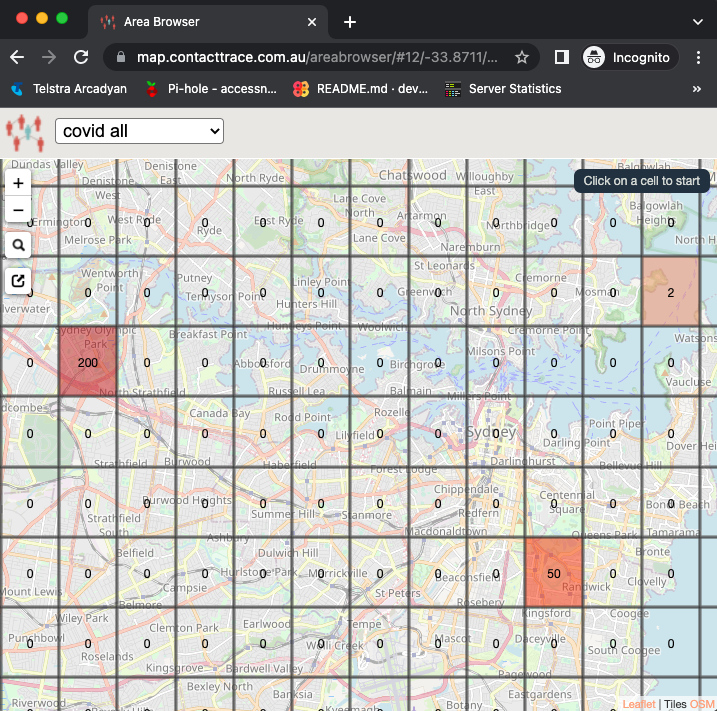
Some web pages on your Personal Console (e.g. the Area Browser shown below) is best view on a larger screen.

Check out the above sample COVID cases in Sydney Australia using the link below on your phone and on your laptop, to appreciate the benefits of accessing your Personal Console from a laptop:

Personal Console Controller

There are numerous problems with using Cloud peripherals like speakers and cameras, which control and monitors you more than letting you control and monitor others.

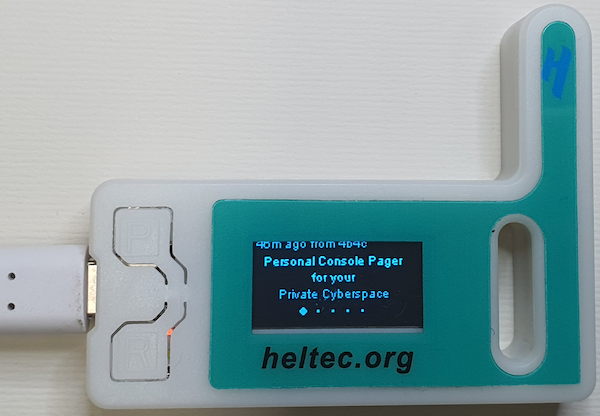
Normally Personal Console runs on mobile phones but it has a special mode to support functioning on controllers that cost only tens of dollars. We brought back the idea of the pager from decades ago due to the massive increase in mobile phone prices recently.

Besides cheaper pricing, advantages of the Controllers include their small size, light weight, low power consumption and massive hardware expandability.

In locations that have NO cell phone nor wifi coverage, you can use Controllers with long range LoRa network capability (in additional to built-in wifi and bluetooth) for basic ultra low cost communication.

These Controllers do NOT need any centralised operator when communicating through LoRa, they send text messages directly to each other using license-free sub-gigahertz long-distance radio frequency bands (915MHz in Australia). They work together as a team, pagers in the middle can relay messages between 2 Controllers that are normally out of LoRa radio range with each other.
Comparison

Since Personal Console has a map frontend and a large situation awareness component, it has been compared with CivTak developed by USA government.

Features Civtak Personal Console
Cross Platform multiple apps single app
Information Domain physical space physical space, cyber space
Events current past, current, future
Development one organisation anyone
Customisation tightly coupled plugins loosely coupled apps
Scale teams populations
Duration mission lifetime

Personal Console gives owners the ability to control their Private Cyberspaces through a single user interface.

Personal Console

Your main user interface into your Private Cyberspace is the Web Console through the Web Browser on your phone. Due to its wide availability Google Chrome is the reference web browser on Android phones, although other browsers can also be used.

Accessing the web console is as simple as visiting the https://app.88.io web site.

Native Apps

The lack of web browser's ability to access some mobile phone resources, mean native mobile apps are required in some cases.

1. Personal Console Phones

1.1. Google Android

Android mobile phones are a great way to start your Private Cyberspace with. As they allow you do more than most iOS phone (e.g. collecting wifi and bluetooth signals around you).

Unfortunately the trend is for Android to start to close up those capabilities as well, although it is still giving you (the device owner) substantially more capability that iOS, so should be your preferred mobile device.

For more details on Google Android Personal Consoles, please CLICK HERE for Android.

1.2. Apple iOS

Apple iOS phones and tablets are fully supported in your Private Cyberspace.

It is best to use Safari browser for your private cyberspace web console and a different browser (e.g. Firefox) to access external web sites.

For more details on Apple iOS Personal Consoles, please CLICK HERE for iOS.

1.3. AOSP Phones

Phones based on Android Open Source Project (AOSP) tend to have better privacy protection than normal Android phones but are harder to use. Hackers who want APSO phones and in the rare case does not know which to pick, can check out phones running the LineageOS distribution.

More details:

  1. https://lineageos.org/

Note other AOSP distributions (as long as they are open sourced) are OK for use with Private Cyberspace, we mentioned LineageOS here simply because we have more experience with it.

Unless you really need an alternative to Android or iOS right now, it is best to skip going to AOSP Phones and go straight to Linux Phones (when they are ready).

1.4. Linux Phones

Linux phones are under active development. Hackers who want a Linux phone and in the rare case does not know what to pick, can check out Linux phones that support the Phosh graphical user interface (GUI). It currently runs on top of a number of mobile Linux distributions on a number of Linux phones.

More details:

  1. https://developer.puri.sm/Librem5/Software_Reference/Environments/Phosh.html
  2. https://puri.sm/posts/phosh-overview

Note other Linux mobile GUIs or distributions (as long as they are open sourced) are OK for use with Private Cyberspace, we mentioned Phosh here simply because we have more experience with it.

We see Linux phones as the future for Private Cyberspaces personal compute and further development should be encouraged but they are currently not stable enough nor have enough apps to be used by non-technical folks.

2. Personal Console Laptop

2.1. Microsoft Windows

Microsoft Windows computers are fully supported in your Private Cyberspace.

For more details on Microsoft Windows Personal Consoles, please CLICK HERE for Windows.

2.2. Apple macOS

Apple macOS computers are fully supported in your Private Cyberspace.

2.3. Linux Distribution